
Board Pack (Riley)
Partnership Growth Roadmap
Build the workstreams and tasks the client will execute, and that drive three downstream views.
Partnership Growth Roadmap (Riley)
The Partnership Growth Roadmap is the plan the client actually executes. You build it as workstreams containing tasks, and three downstream views read straight off it: the Timeline View, the Key Areas of Focus, and the Crawl / Walk / Run phasing. That makes this the highest-leverage worksheet in Riley's set, because how you star and sequence tasks here reshapes three other pages automatically.
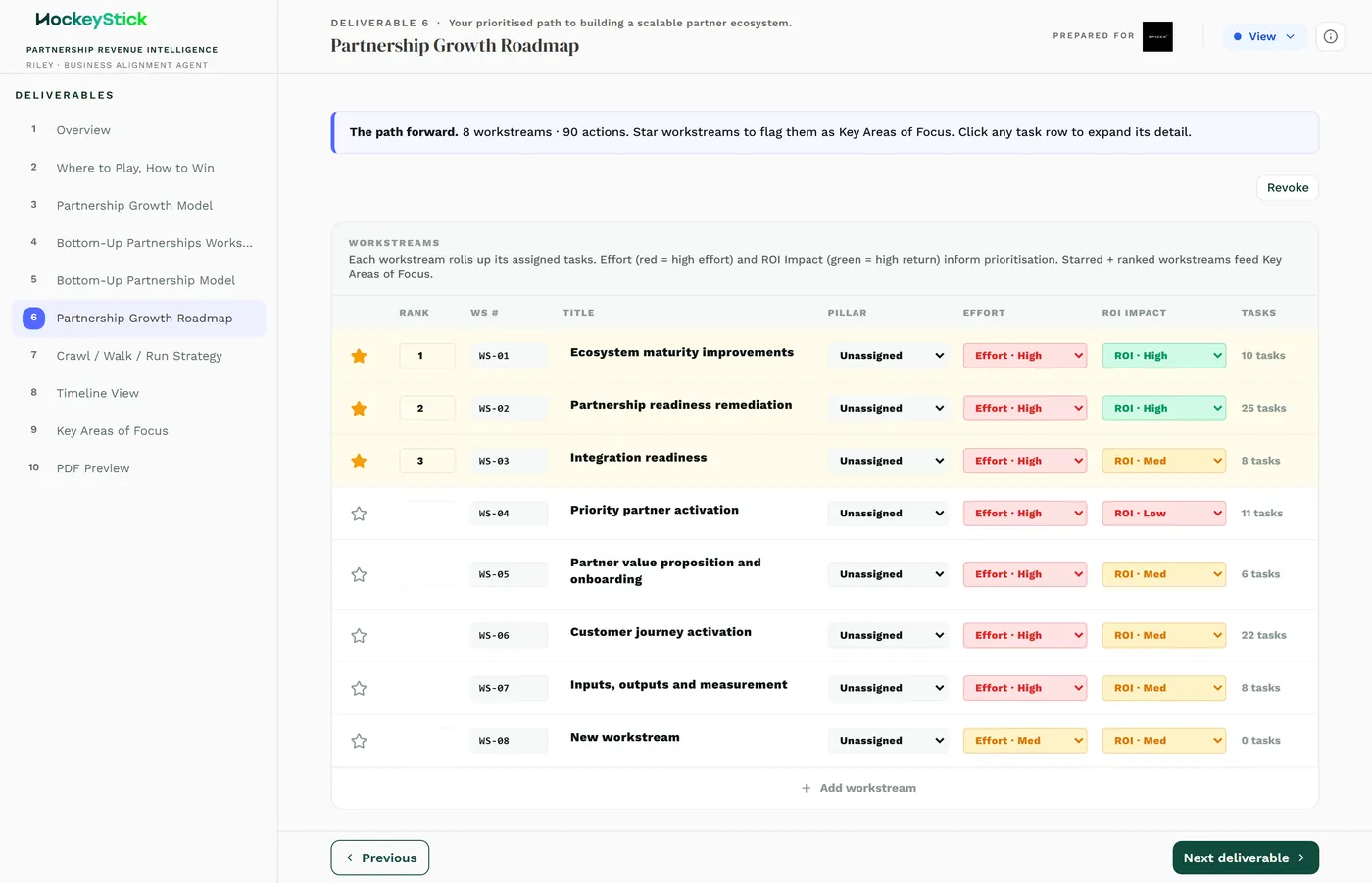
Workstreams and tasks
The roadmap is organised as workstreams, each holding a set of tasks. A workstream is a theme of work (recruiting, enablement, co-sell, measurement); the tasks under it are the concrete steps. Build the workstreams first so the tasks have a home, then fill in the tasks.
Per-task fields
Each task carries:
| Field | What it does |
|---|---|
| Name | The task, stated as an action. |
| Owner | Who is accountable for it. |
| Start / end dates | When it runs. These drive the Timeline View and the Crawl / Walk / Run phasing. |
| Status | One of Not started, In progress, Complete, Blocked. |
| Effort | The size of the task. |
| Priority star | A star that promotes the task into Key Areas of Focus. |
| Dependencies | Other tasks that must land first. |
| Notes | Context, links, anything the owner needs. |
The client can edit this one
The Partnership Growth Roadmap is client-editable. It is the one worksheet in the pack the client owns and updates, because it is their execution plan, not a consultant deliverable. Practically:
- Build it with the client, not for them. A roadmap they did not shape is one they will not run.
- Expect the statuses, dates and owners to change as the client works the plan.
- Keep the structure clean when you hand it over. The client will be adding and
moving tasks, so the workstreams and starring you set are the frame they build on.
Three views derive from it
Everything downstream reads from this worksheet, so editing the roadmap updates all three at once:
- Timeline View buckets the tasks into months from their start and end dates.
Get the dates right and the timeline is right.
- Key Areas of Focus is the set of starred tasks. The star is not
decoration: it is the switch that puts a task on the focus page. Star the few things that genuinely matter, not everything.
- Crawl / Walk / Run phases the work by timing, so early tasks land in Crawl and
later ones in Run. Sequencing and dependencies decide which phase a task falls into.
Completing it
- Lay out the workstreams so every task has a clear home.
- Add tasks as actions, each with an owner, start and end dates, effort and status.
- Set dependencies so the sequencing is real, not just a wish-list order.
- Star the few tasks that belong in Key Areas of Focus, no more.
- Read the Timeline and Crawl / Walk / Run back to check the plan phases the way
you intend.
Reviewing before publishing
- Every task has an owner and dates. A task with no owner or no dates does not
phase correctly downstream.
- Starring is disciplined. Key Areas of Focus reflects the genuine priorities,
not a long list.
- Dependencies and sequencing are right. The Crawl / Walk / Run phasing reads
the way you would explain the plan.
- It is ready for the client to run. The structure is clean enough that the
client can pick it up and edit it without breaking the downstream views.