
Workshop Pack (Sam)
Generate, review and publish the Workshop Pack
The end-to-end flow for running Sam and getting the pack to the client.
Generate, review and publish the Workshop Pack
Sam produces the Workshop Pack: the diagnostics and foundations that open every Align engagement. This is the full flow from a launched run to a published pack in the client's portal.
Before you start
The intake must be complete. Sam reads the client's intake answers, so an unfinished or thin intake produces a weak pack. If the intake still needs work, sort that out first, then come back.
Open the Sam workspace
You can reach Sam two ways:
- From the client detail page, on the Journey tab, use the workshop step's action to open Sam.
- Straight to the workspace at
/admin/sam/{engagement}.
Either way you land on the same run banner and deliverable grid.
Launch Sam
Hit Launch Sam. A prelaunch modal opens and checks readiness, including that the intake is complete. Clear anything it flags, then confirm to start the run.
Watch the run stream
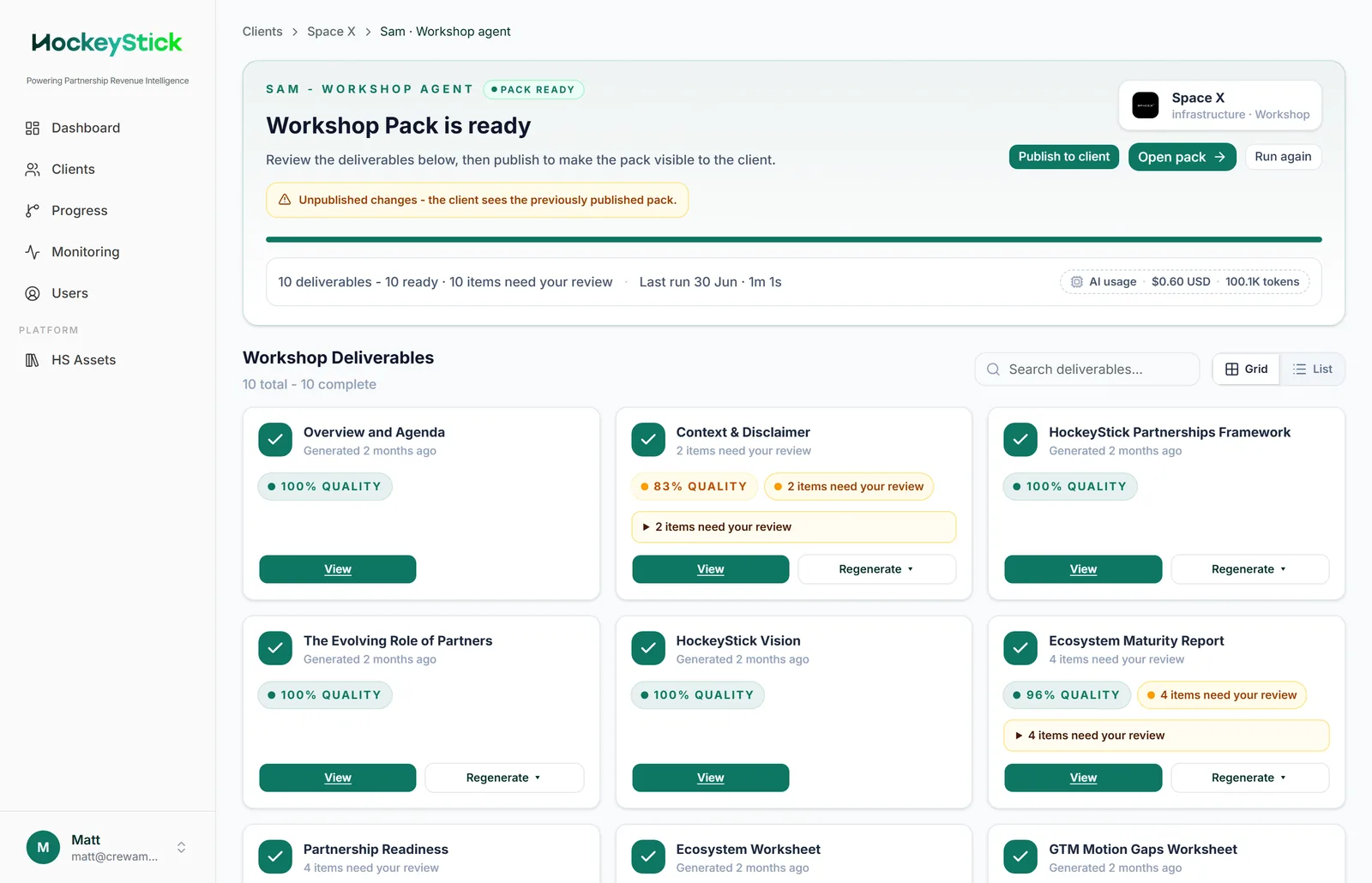
The run banner streams live while Sam works: the run status, elapsed time, and token and cost usage. Let it finish. When Sam is done the banner switches to "Workshop Pack is ready" and offers Publish to client, Open pack and Run again. The deliverable grid fills in below, with a card per page.
Review the pack
Open the deliverable preview and read every page as the client will see it. Each deliverable card shows a quality percentage, and any card that needs a look is flagged with "items need your review". Use View to read a page and Regenerate to rebuild it. Work through anything flagged. See Reviewing deliverables before publishing.
Regenerate weak or failed pages
If a page failed or reads poorly, use Regenerate on its card, or Run again for a full re-run if the whole pack is off. Regenerating changes the pack in the workspace but not what the client sees: until you publish, the workspace shows an "Unpublished changes, the client sees the previously published pack" banner. See Regenerating a deliverable.
Publish to the client
When the pack reads correctly and the failed-page count is acceptable, use Publish to client. Publishing clears the unpublished-changes banner and makes this version the one the client sees. See Publishing to clients for what the publish modal confirms and what the client sees.